
ListBuilder records in recipient groups
ListBuilder records can be used to send direct mail in Stannp.com. As licenced records, these cannot be edited or exported. If a recipient group contains a mix of licenced data and your own uploaded data, these will look and act slightly differently.
-
Only non-licenced record fields, indicated in blue and red, can be edited.
- All available data fields will be populated in licenced records. Column headings are Stannp.com defaults and cannot be edited.
- Licenced records will be indicated by black font and a lock in the 'Licenced' column.
- If exporting a mixed recipient group, only non-licenced records will export.

Removing records from a recipient group
Licenced records cannot be deleted, but they can be moved out of a group.
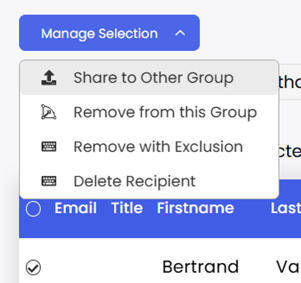
- Select a record to bring up the 'Manage Selection' dropdown.
- Select 'Share to Other Group'. A popup will appear with a list of your other recipient groups. Exit to create a new group and return to this stage, if required.
- Once the record is moved, re-select it in the original group, and select 'Remove from this Group'
- Only shared records can be removed. An error will appear to notify you if this is still required.
ListBuilder records can also be added to the Blocklist to suppress them from future direct mail campaigns.
How much does ListBuilder cost?
Creating a data list is free. You can create your radius, add filters, refine your search, and see the number of records and cost. You will only need to pay once you've completed the search and want to acquire the list.
The base cost is $0.04 for each consumer data record and $0.06 for each business data record. Adding additional [premium] filters adds $0.01 per record, for each added filters.
Tax will be calculated based on the State and Local tax of your billing address, so you will only be charged the accurate calculated tax amount. Average tax rates are 2%. While we calculate sales and use tax in the background, we apply a temporary hold of 8.5% tax on your payment method. No transaction is completed yet until the calculated tax is applied.