
In a situation where you have sent mail to someone who does not want to receive anything from you in the future, or you have chosen to block a person and/ or address from future direct mail campaigns, then you can add them to your blocklist.
This means that, however you send direct mail, the selected criteria will not be sent to in the future.
How to add a recipient or address to your block list
Once you're logged in, select the 'Recipient Groups' dropdown
'Blocklist' will appear for selection.
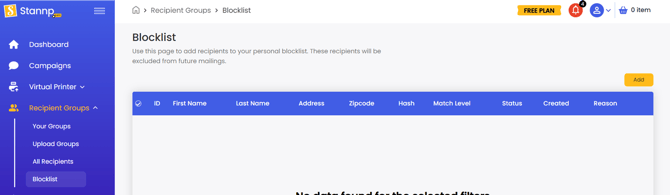
Use the search feature to find your recipient or enter the details manually. All recipients with the search criteria will appear for you to select from.
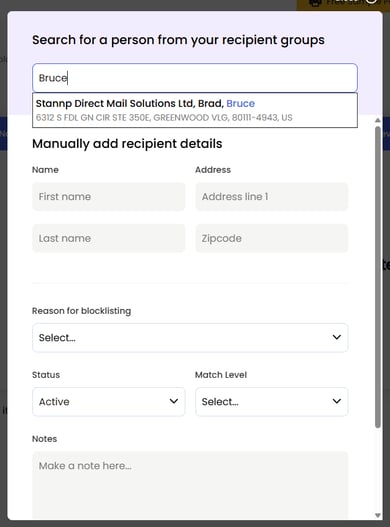
Once you have selected the recipient or manually entered the details, complete the blocklist form.
- Reason for blocklisting - Select your preferred option from the dropdown
- Status
- Active: The block is active and this recipient will not be sent to and cannot be readded as a new recipient.
- Inactive: The recipient remains in the block list but the details can be added as a new recipient and be sent to in future direct mail campaigns.
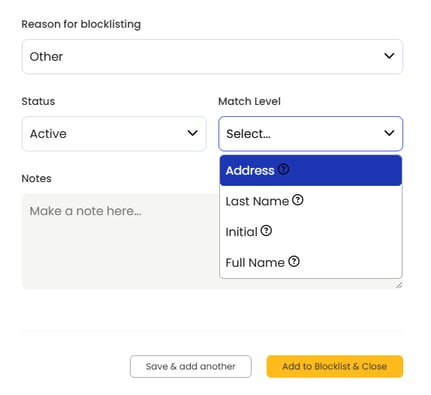
- Match Level
- Address: Address line 1 and Postal/ Zip code are the block criteria
- Last Name: Last name is combined with the Address criteria
- Initial: First name initial is combined with Last name and Address criteria
- Full Name: First name and last name is combined with Address criteria
You can hover over the '?' next to each dropdown item for more details when adding to your blocklist.
If you select the Last Name or Initial option and an address has multiple occupants with the same last name or first initial and last name, this address will still be sent mail for other recipients. The most accurate match level, for precise blocking, is Full Name.
- Notes - Add additional desired notes that could be useful in the future
Moving recipients to your block list will remove them from 'Recipient Groups' and 'All Recipients'.
Want to send to blocked recipients again?
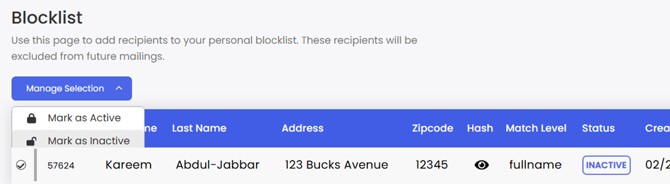
Go to your 'Blocklist', find the recipient, select the recipient, click 'Manage Selection' dropdown and select 'Mark as Inactive'.
Once their status is 'Inactive', the recipient can be uploaded for future mail sends. The original recipient will remain in the Blocklist and be readded as a new recipient with a new recipient ID.
How do we block recipients and when?
We actively check your blocklist, based on your match levels, each time you send direct mail.
Important:
We can only block recipients when the recipient data exactly matches the blocked 'Match Level' data. If you have blocked 'Street' or 'Avenue' and upload data with 'St' or 'Ave', this may not match accurately.
Campaigns
Stannp.com will perform a final check for blocked recipients at the final approval stage. This is when the recipient data is finalised for the campaign. If the data set features blocked recipients, the the recipient count will decrease and checkout price adjusted to reflect the final count.
Virtual Printer
The Virtual printer uses OCR (optical character recognition) technology to read recipient data. If blocked recipient data is read, the Virtual printer will skip over the item and process the next one. The recipient details on the pre mail merged letter must match the blocked 'Match Level' data.
API
If a sent API record matches the block list, a record will not be created. Instead of giving the usual '200' OK response, a '422' error response will occur.
In all cases above, blocked recipients will be identified with a "Recipient is suppressed and cannot receive mail" message, in Stannp.com, at the point the blocklist check takes place and in reporting.