
Remove barriers to engagement
There's three primary things you need to focus on when designing and sending your direct mail campaigns. QR codes connect to all of these.
-
Data: Who are you targeting? High quality recipient data greatly impacts engagement and ROI, and can add immense value to create highly personalised direct mail.
-
Timing: Send your direct mail campaign when it's most relevant to recipients. This will generate increased chance of engagement. Make sure your QR code destination lands at a time when it will have the greatest impact.
- Design: Create a design that is aligned with your audience, use language and messages that is accessible and will mean something to them (speak to your audience), add imagery that supports the copy or it could deliver the message its self (sun shining over a topical beach or a broken down car are powerful images, for example).
When using Stannp's QR code generator, you cannot only report back on the number of scanned engagements, you can see which individual recipients have engaged. More on that to follow.
Adding QR codes
Make sure your destination URL is secure!
When pasting a copied link into the QR code field, make sure it leads with 'https'. The 's' means the URL is secure.
If this URL leads with 'http' only, QR code scanners and browsers may flag this as a non-secure link and not enable access for recipients.
Designing QR codes
Do you want your QR code to blend in or STAND OUT? Design QR codes with your goals in mind.
QR code location and size: Drag the bottom right corner to easily adjust the QR code size. 20mm-40mm squared is ideal for optimal scanability. Use the 'Designer' tools at the bottom of the left design menu to accurately measure design content, with the Grid and Ruler lines.
QR code location: Make sure QR codes are within the marked safe zone so they remain complete through print and production. Drag and drop to your preferred location.
Change the QR code colors: You can adjust the QR code and the background colors. Select from common colors, the colours featured in your design, add the hex code, or use the eye dropper to find a color match
Consider the physical size of your mail. If sending a small postcard, and you make the QR code very small, there is a chance scanning this will be difficult or not possible.
Personalize QR codes destinations to delight customers
Have you created a PURL/ dynamic landing page to offer high relevance and value to customers? You can add this to your recipient data by adding the links to a column in your in the CSV data upload or via the API connection.
-
Add recipient specific destination links to a column with a clear heading, and map this as a custom variable field during the upload.
-
Add a Stannp.com QR code to your design.
-
Enter the custom variable to the open text destination field with a curly bracket at each end - {}, and the exact naming convention listed in 'Data Management' (in your settings).
The QR code will then become dynamic and send individual recipients to the intended destination URL.
Custom variables will always be in lower case.
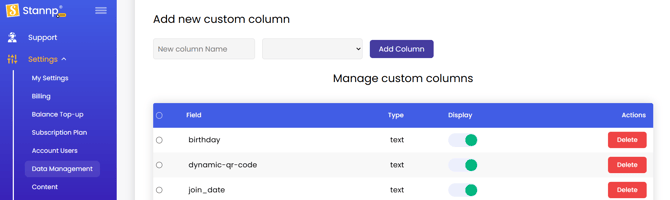
Example: If the custom variable is dynamic-qr-code, then the custom field should be {dynamic-qr-code}
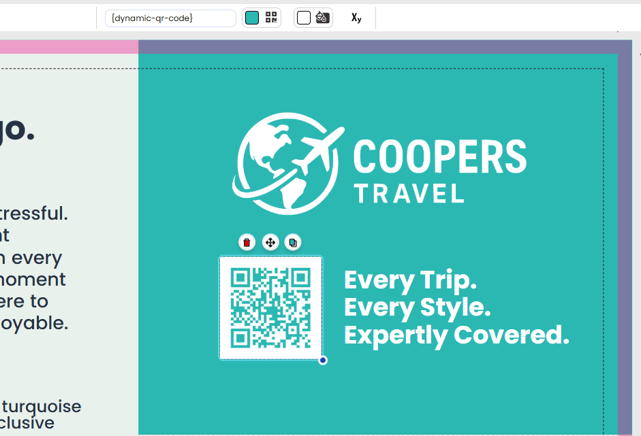
QR codes: How many is too many?
Consider the reason and relevance of QR codes, and how they impact the design of your mail item.
If you're sending a small postcard with limited space, perhaps one is enough. If you are designing a multi-side mail format with more space for messages, adding multiple QR codes to support messages and offers is great.
Make sure the QR code is combined with a compelling CTA (call to action). This will be the reason someone scans that QR code.
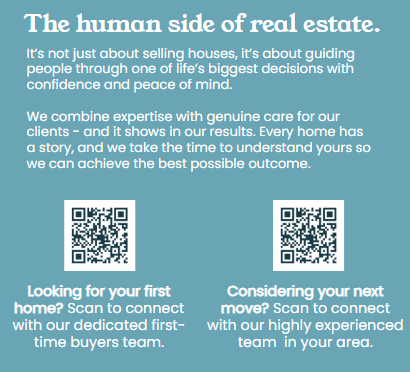
Diverse recipient group?
If you're mailing multiple demographics or sharing offers that could be more relevant to a section of recipients, multiple QR codes provide people with the choice of what they want to engage with.
Multi-device engagement
QR codes are by far the smallest barrier to engagement. A simple scan is all it takes. If however, you want to offer customers multiple ways to engage then you can also add a written URL alongside the QR code. This offers multiple routes to engagement on various devices.
QR Code x WhatsApp Connection
Send QR code scans directly to your WhatsApp Business account. To use WhatsApp for this:
- Open WhatsApp Business
- Go to Settings > Business Tools > Short Link
- Tap QR Code to view your unique code
- Add this code as the destination URL in Stannp.com