
As you may already know, sending international mail from your location can be expensive. With tax rate and regulation changes in the US, tax calculations have become more complex, so we want to offer you all options for sending direct mail internationally. You can read more about US Sales & use tax collection here, if you wish.
What are your options?
If you have a UK/ EU Stannp.com account, and want to send to the US or Canada, you have two options:
- Send at your regions international rate:
Remain in your UK/ EU account and send a UK format with with the international postage rate. You can see those rates in on our website here. Select the 'Send Internationally' tab. - Send at the other regions domestic rate:
Create a new Stannp.com account for your preferred region. This is free to do*, and means you'll be charged the local direct mail item rate, local tax rate, and domestic postage rate.
*Setup a free account. Subscription plans are chargeable for individual regions, as selected.
All billable items (including subscription plans, direct mail items, optional add ons, etc.) will be charged the accounts local currency, and not a preferred currency. All will be detailed at checkout prior to purchase.
If you have already created a mail design in one region or format, and want to transfer this to another format in a second region, check out this article.
How do I create an additional account?
Can I use the same email address, as my username?
You can use the same email account, BUT your Stannp.com username must be unique. Just make one small change to achieve this.
Add a plus symbol ('+') followed by additional number or letter differentiators. This retains your original email address while creating unique username for logging in.
Also make sure you select the relevant country from the dropdown, at registration.
Example: If your email address is 'firstname.lastname@company.com' , just create the account with 'firstname.lastname+us@company.com'
Make sure to use symbols or characters only, after the '+'. Spaces are not valid when creating email based usernames. Full stops or underscores work well.
Create a US account
If you're sending to the US, you can create an account using the 'eu1' URL or the 'us1' URL.
https://app-eu1.stannp.com/register OR https://app-us1.stannp.com/register
Create a Canada account
If you want to send mail to Canada, but not at the international rate, you must create an account with our ca1 URL : https://app-ca1.stannp.com/register
Our CA platform has a separate dedicated server and the 'ca1' URL must be used to access your CA account every time you login. You cannot login to your Canada account from the eu1 or us1 URL.
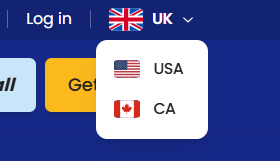
The easiest way to use the correct server is by using the website region dropdown, at the top right of the Stannp.com homepage.
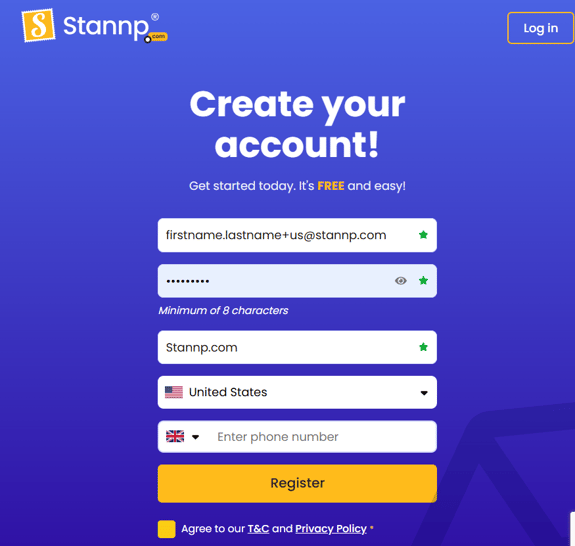
What might the registration fields might look like? Image at the bottom of this page.
What is the value and benefit of doing this?
The primary benefit of creating an account for the region you're sending to, for most users, would be cost saving. As an example, for illustrative purposes only:
Sending 500 A4 Letters internationally from the UK to the US at the international rate of £2.11** per item, would total £1,055 + VAT (at 20%). (+£0.06 per item if using a free Stannp.com account)
Sending 500 of a comparable US format, 8.5x11 letters, to the US from a US Stannp.com account, would be charged at the US domestic rate of $1.00** per item, totalling $500 + taxes (US tax is made up of combined state and local tax. A variable tax calculated between the mail source and the mail destination). Read more about how Sales and use tax is calculated, here.
Even adding a paid subscription plan for an additional region, would further cut the cost of sending mail, remaining well below the international rate. For example, adding a $12 p/month starter plan could unlock further cost reductions, resulting in even more savings.
Creating this additional account is optional. You can stick with the one account and send at the international rate.
**based on the 1-page single sided letter formats international and domestic sending rates as of September 2026.
What might the registration fields look like?
The example below is a UK user creating a US Stannp.com account. Adding the '+us' identifier creates a unique username and user reminder when logging in, while emails will still goes to your primary email address.
How do I pay when sending mail in another region?
If you setup an additional Stannp.com account, in another region, you can use your local payment card and billing address.
Example: UK user, setting up a US Stannp.com account, can pay for a campaign or top up balance with a valid UK payment card and billing address.
Still have questions?
Give us a call or get in touch on the webchat