
Enable low balance reminders and auto top-up in your account settings
You can find everything to do with your finances and billing in your account settings tab. As independent actions you can activate your desired combination of these and set a trigger amount for the reminder and another trigger balance for the automatic top-up.
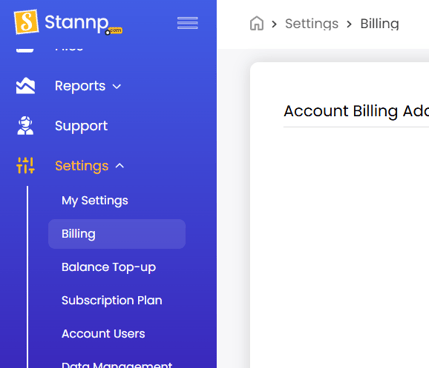
Information about adding and managing billing addresses and payment cards can be found in our knowledge base HERE
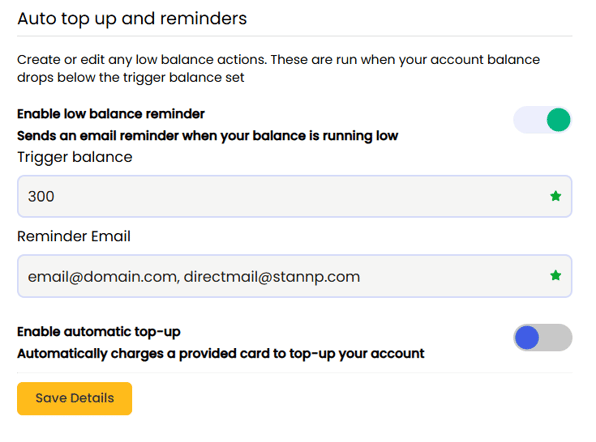
Enable low balance reminder
When your balance is low, this will send you an email to take action. Enter an amount in the 'Trigger balance' field and the email address you want to be notified. Use a comma separated list for multiple email addresses (see image below). The trigger balance will be in your account currency.
Enable automatic top-up
Enable automatic top ups to maintain your balance for sending active mail campaigns. Enter your 'Top-up amount' and select your payment card (if multiple options have been added).
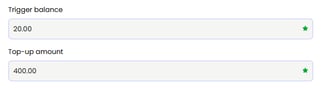
Your trigger balance will act as the threshold and when your balance falls to this, or below, your balance will be topped up and payment card charged.
This is useful if you have several automated API workflows.
To reiterate, the top up amount is how much your balance will be increased by if it ever goes below the trigger balance threshold. The 'Top-up amount' is excluding relevant tax charges.