
If you're ready to send but don't have data/ addresses yet, you can simply enter a postcode, set your radius, and send mail! It's also free to use meaning there's no charge for using the data, and you'll just pay for the mail items you're sending.
Our Radius Search tool can be used in three distinct ways to help you target the right areas for your direct mail campaign.
Access the Radius Search feature
Login to your Stannp.com account
Select 'Recipient Groups' in the left toggle menu then select 'Radius Search'.
You can then use the three radius search options to create a recipient group.
This is a great feature if you want to promote your business/ services to the same area as existing customers or test a campaign to specific geographies.
Radius Search
Enter a single full postcode to act as the central pin for your radius.
Adjust your preferences including:
-
the radius
-
the address type (Business, Residential, or both)
-
add any desired filters
-
enter your desired 'Address to' text (this will be added in the top line above the address), and
-
create your group.
If a limit filter is applied, addresses will be added from radius centre point (the postcode you entered) to the edges of the radius circle.
This means that addresses in the outer area of the radius may not be captured if the limit is reached.
Postcode Search
If you want to send mail to one/ multiple specific postcodes, you can add one or multiple postcodes, with a comma separation.
-
Enter full postcode(s) to use in your search
- if adding multiple postcodes, use a comma to separate these
- add your filters: number limit and address type (Business, Residential, or both)
-
enter your desired 'Address to' text (this will be added in the top line above the address), and
-
create your group.
Full postcodes are associated with more precise locations (e.g. a single road or part of a longer road) so the results in this 'Postcode Search' may be fewer than you'll see in the 'Radius Search' (above) and the 'Partial Postcode Search' (below). These two options will capture a larger mapped area, and therefore, more addresses.
Partial Postcode Search
This search works in the same way as the [full] Postcode Search above but only the first 4 postcode characters are required. A single partial postcode will return all postcodes that begin with these first 4 characters.
If you set an address limit for Postcode or Partial Postcode searches, the results will start with the first postcode in your list and stop once the limit is reached.
This means the last postcodes in the search list may not be captured if the limit is reached.
How to use your Radius Search Groups
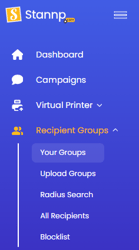
Radius search groups are saved in your Recipient Groups area. You can retain these for future use, edit the group items or delete these as desired.
These are available to use by selecting the group when creating and sending a direct mail campaign in Stannp.com.
Notes
- Storing radius search addresses, to your Stannp account, is subject to subscription plan limits. See plan limits HERE.
-
Stannp is GDPR-compliant: the data used is from reputable sources and cleaned regularly.
-
There is no charge for using this data.
-
You can save your radius lists for future use.
- No minimum quantity.