
All data needs to be correctly assigned to the right column so that we can identify it and use it appropriately. We have standard headings and columns that apply to everyone. Then you can create your own custom headings as well.
The following are the standard headings we have. We recommend using these as the headers for your data.
-
title
-
firstname
-
lastname
-
company
-
job_title
-
address1
-
address2
-
address3
-
city
-
province
-
country
-
postal code
-
ref_id
When importing data to our platform it's best to check each of your columns to see if they've been mapped to the right heading.
Please note, if address line 1 and your zipcode have not been mapped correctly, the address will not verify against the address record. This can mean it might cost more to send your mail as it does not match Canada Post's database. Read more about address verification here.
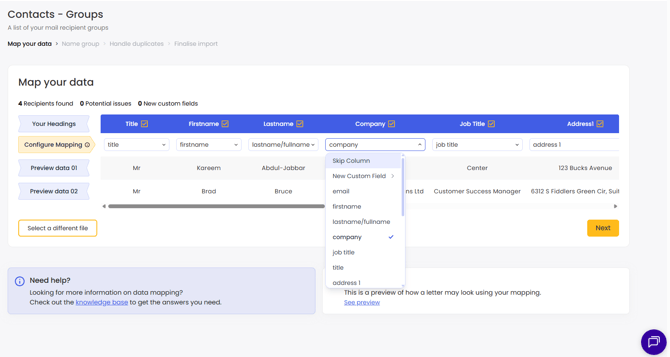
As you can see, if your heading is close enough match, it will automatically map to the right field.
If the heading is slightly off it will default to 'Text' (New Custom Field). This heading is used for any custom variable fields that you might wish to add to your data and will generate a new custom field. Read more about creating custom variables.
If you want to match to one of our standard fields, you can select the desired option from the same drop down. If your data is not mapped correctly, you can simply change this here by clicking into the drop down.
You can also skip any columns that are not relevant to your mailing. Deselect in the 'Your Headings' row or select 'Skip Column' in the drop down.
Please note - When viewing your data in your mailing list you will not be able to see any custom large text.